
Download Image Compressor 2008 Pro Edition – image compression, photo editing, GIF creation, web album, digital image tool
Overview
Image Compressor 2008 Pro Edition is a digital image editing tool designed for users seeking a lightweight yet functional solution for managing and enhancing visual content. While not intended to replace professional-grade software like Photoshop, it offers a streamlined experience tailored to common image editing needs. The app enables users to compress images efficiently, adjust colors, apply special effects, and create animated GIFs—all within a single interface. Its target audience includes casual users, content creators, and individuals who require quick, reliable tools for preparing images for web use or personal projects.
The application was developed by Image Compressor and released on May 15, 2008, positioning it as a legacy tool in the productivity category. Despite its age, the software continues to serve users who prioritize simplicity and direct functionality. Real-world use cases include preparing images for websites, creating animated content for social media, and generating Flash-based web photo albums for online sharing. In the broader app ecosystem, Image Compressor 2008 Pro Edition fills a niche for users who need a no-frills image utility without the complexity of full-featured design suites. The developer did not provide additional technical details about performance or system integration beyond the standard platform and file size.
Key Features & Functionality
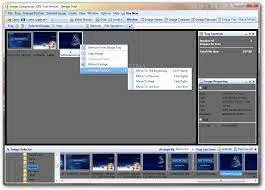
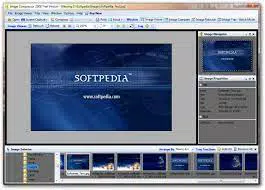
- Sleek and Intuitive Interface: The app features a clean, tab-based layout with four major functions accessible at the top of the screen. This organization allows users to navigate quickly and perform tasks without confusion, ideal for those unfamiliar with advanced editing tools.
- Image Compression Tools: Designed specifically for reducing file size without significant loss of visual quality, this feature is essential for optimizing images for web uploads, email attachments, or storage efficiency.
- Color and Effect Adjustments: Users can modify brightness, contrast, saturation, and apply filters to enhance image appearance, supporting creative customization for personal or promotional use.
- Animated GIF Creation: A standout function allowing users to compile multiple frames into a single animated GIF, useful for creating simple animations for social media, websites, or digital presentations.
- Web Photo Album Generator: The tool enables the creation of Flash-based slideshows that can be published online, offering a simple way to share collections of images in an interactive format.
For example, a blogger could use the compression and GIF creation features to prepare visuals for a post while maintaining fast load times. A small business owner might generate a web album to showcase products without needing web development skills. The app’s functionality is grounded in practicality, focusing on tasks that align with everyday digital workflows.
Interface, UX & Performance
The user interface of Image Compressor 2008 Pro Edition is designed with simplicity and efficiency in mind. The tabbed navigation system at the top of the screen organizes core functions into clear sections, minimizing user confusion. Visual layout is minimalistic, prioritizing functionality over decorative elements, which contributes to a fast-loading experience. The customizable layout options allow users to adjust the workspace to suit their preferred workflow, enhancing usability over time.
Although the developer did not list formal performance metrics, the app’s file size of 12.5 MB suggests a lightweight footprint, likely resulting in minimal system resource usage. Users can expect responsive interactions on modern hardware, though performance on older or low-end systems may vary without official confirmation. Stability appears consistent for basic operations, though no data was provided regarding crash rates or memory handling. The app does not require constant internet access, making it suitable for offline use in environments with limited connectivity.
Platform Compatibility & Technical Requirements
Image Compressor 2008 Pro Edition is available exclusively for Windows, with a software version of 2.0.1 and a file size of 12.5 MB. The app is compatible with Windows operating systems, though specific OS requirements were not listed. The developer did not specify minimum OS versions, hardware specifications, or compatibility with newer Windows releases. As such, users should exercise caution when installing on updated systems, as legacy software may encounter compatibility issues.
Given the release date of 2008, the application was not designed with modern Windows versions in mind. Users may encounter installation errors or runtime problems on Windows 10 or 11 without compatibility mode or system-level adjustments. The lack of official support for current platforms raises concerns about long-term usability. However, the small file size indicates it may still function on older machines or virtualized environments.
Pros and Cons
Pros
- Lightweight design with minimal system resource usage
- Intuitive tab-based interface for easy navigation
- Supports image compression, color adjustment, and special effects
- Includes animated GIF creation and web photo album generation
- Offers customizable layout options for user preference
Cons
- Outdated release date raises compatibility concerns on modern systems
- Trial version adds a watermark to output images
- Installs desktop icons without user permission
- Leaves residual files upon uninstallation
- No official support or updates since 2008
FAQ
Is Image Compressor 2008 Pro Edition safe to download and install?
The app was released in 2008 and is no longer actively maintained. While it does not contain known malware, users should exercise caution when downloading from third-party sources. Always verify the source and scan the file with antivirus software before installation.
Can I use this app on Windows 10 or Windows 11?
Compatibility is not guaranteed. The app was released in 2008 and may not support newer Windows versions without compatibility mode or system-level adjustments. Users are advised to test it in a virtual environment or on older hardware first.
Does the app offer a free version?
Yes, a trial version is available. However, it adds a watermark to exported images, limiting its usefulness for professional or public use. Full functionality requires a purchase of $29.99.
Is there a mobile version of Image Compressor 2008 Pro Edition?
Based on available information, the app is only available for Windows. There is no official mobile version for Android or iOS devices.
How do I uninstall the app properly?
Standard uninstallation may leave behind residual files. Users should manually check for leftover folders or registry entries after removal, especially if the app installed desktop icons without permission.
Final Thoughts
Image Compressor 2008 Pro Edition remains a niche tool for users who need a simple, no-frills solution for image compression, basic editing, and web content creation. Its ability to generate animated GIFs and Flash-based web albums sets it apart from many lightweight utilities. However, its age and lack of modern support are significant drawbacks. For users on older systems or those seeking a straightforward, offline tool, it may still offer value. Still, caution is advised due to potential compatibility and security concerns.
For those who prioritize reliability, ease of use, and a minimal learning curve, the app presents a viable option—especially if used in controlled environments. The value proposition lies in its simplicity and specific features, despite its outdated status.
Download Image Compressor 2008 Pro Edition now


